

What is ISNA Function in Excel?
The ISNA function is a type of error handling function in Excel. It helps to find out whether any cell has “#N/A error” or not. This function returns the value “true” if “#N/A error” is identified. It returns “false” if there is any value other than “#N/A error.”
The ISNA function is a part of the IS functions. It helps in handling “#N/A errors,” analyzing data, and making comparisons.
Syntax
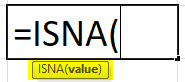
Parameters
It is clear from the preceding syntax that the ISNA formula in Excel has only one parameter. It is explained as follows:
- Value: The value can be another function, formula, cell, or value that needs to be tested. It is a very flexible parameter.
The ISNA function in Excel returns the following values:
- True: If the “value” parameter returns “#N/A error” or,
- False: If the “value” parameter does not return “#N/A error”
The examples given in the subsequent section will further explain the ISNA function.
Purpose of ISNA Function in Excel
The goal of the ISNA function is to identify whether “#N/A error” exists in any cell, formula, value or not. “#N/A error” is more common in the formulas which require Excel to find something. If a formula looks for any value that does not exist, the system returns “#N/A error.”
It returns “true” or “false” based on the existence of “#N/A error.” This function helps Excel users deal with the “#N/A error” by replacing it with another value.
How to Use the ISNA Function in Excel? (with Examples)
This section will explain the uses of the ISNA function with the help of examples containing actual data. As stated earlier, it uses only one mandatory parameter.
Example #1
In the following image, we have used the FIND function of Excel. It returns the position of the “i” character in cell A2.
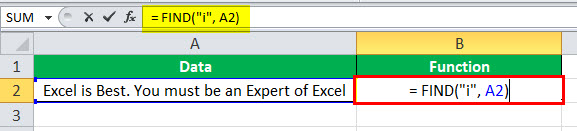
So, the output of the FIND function is 7.

Now, let us pass the previous FIND function as a parameter.

Here, we have used the FIND function in the parameter which returns the output “7”. ISNA function returns “false” because the output of the value parameter is not “#N/A error.”
Example #2
Let us pass “#N/A” directly as a parameter to the ISNA formula in Excel.

On directly passing “#N/A” as a parameter to the ISNA function, it returns the value “true.” This proves that ISNA detects “#N/A error” present in any cell.

Example #3
Let us pass “#VALUE!” as a parameter to the ISNA formula in Excel.
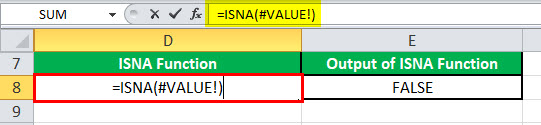
The “#VALUE!” parameter is also a data missing error. ISNA returns the value “false” because it does not detect any error other than “#N/A error.”

Example #4
In this example, we use the lookup function as a parameter of the ISNA function.
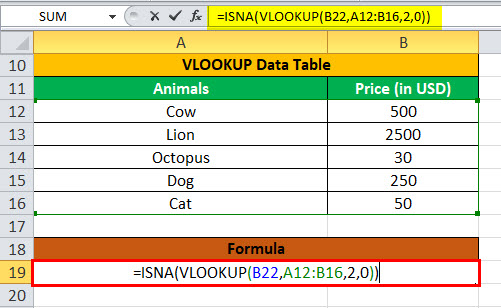
Here, the output that we get is “true.”

Frequently Asked Questions (FAQs)
What does the ISNA function do in Excel?
It helps the Excel user in the following ways:
– It detects “#N/A errors.”
– It helps handle “#N/A errors” by returning a particular value, reference, message or formula.
– It helps replace the “#N/A error” with a text of your choice when combined with VLOOKUP and IF function.
– It finds whether a certain value exists in a column or not when combined with the MATCH function.
– It facilitates comparison between two columns when combined with the MATCH function.
– It helps analyze results, especially when working with groups of formulas.
How to use the ISNA function with VLOOKUP in Excel?
The syntax for the ISNA function with VLOOKUP is “=ISNA(VLOOKUP(Argument)).” The VLOOKUP returns “#N/A error” when it is unable to find the value it was looking for. For example, while searching for item X in the lookup table that does not exist, the VLOOKUP will return “#N/A error.”
The ISNA function is combined with VLOOKUP to find out whether the “#N/A error” exists in the data source or not. The IF-ISNA combination can be used with VLOOKUP to return a customized text in place of the “#N/A error.”
What is the opposite of the ISNA function in Excel?
The opposite of the ISNA function is “NOT(ISNA(yourformula)).”
If “yourformula” gives “#N/A error,” the ISNA function will return the value “true.” If “yourformula” has no errors, the ISNA function will return the value “false.”
- The ISNA function is an error handling function in Excel that helps to identify “#N/A error” in a cell.
- The ISNA function, used as a worksheet function, has only one parameter.
- The value parameter can be another function, formula, cell, or value that needs to be tested.
- It returns a Boolean value (true or false).
- The value “true” is returned if “#N/A error” is found and “false” is returned if “#N/A error” is not found.
Recommended Articles
This has been a guide to ISNA Function in Excel. Here we discuss how to use this formula along with an Excel example and a downloadable template. You may also look at these useful functions in Excel –