

Zero-based Budget Spreadsheet Template
The zero-based budget template refers to the budget prepared mainly to justify the expenses for each new period where the budget starts from zero, unlike in a traditional budget where the adjustments are made in the previous budgets. Zero-based budgets are prepared where the difference between the income from all the sources and the expenses from all the sources comes to zero.

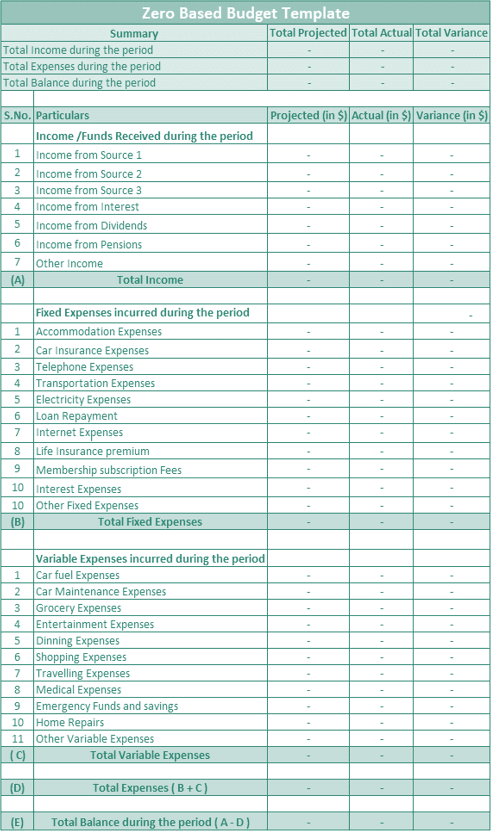
About the Template
- It highlights a person’s income from all the sources for the period under consideration and the expenses for the same period. Lastly, the difference between income and expense should be equal to zero.
- In the case of the zero-based budget, in the end, one should balance the budget fully, and one should have zero budget as leftover. The template given above shows the budgeted income and costs expected to be incurred by the company along with the income and costs’ actual balance for the period.
Components
Following are the details generally present in the template:
#1 – Heading at the Top
The heading ‘Zero base budget Template’ will be mentioned in the template. It will remain intact for all the template users. Furthermore, the heading tells the user the purpose of creating such a template.
#2 – Summary of the Budget
This summary detail of the budget is at the beginning of the template. It contains details of the total income during the period, total expenses during the period, and the total balance on an actual and projected basis. These figures will be populated automatically from the values derived from the below steps.
#3 – Fixed Expenses
Under this, the user will enter all the fixed expenses in budgeted and actual values from all the areas.
#4 – Variable Expenses
Under this, the user will enter all the variable expenses in budgeted and actual values from all the areas.
#5 – Balance
Balance left will be calculated automatically after subtracting the total of the fixed and the variable expenses from the total income. Therefore, this balance of projected figures should be equal to zero, i.e., one should balance the budget fully.
How to Use this Zero Based Budget Template?
Following are the steps to use the zero-based budget template:
- A person using this template has to enter all the details as required in the fields that are not already pre-filled.
- For this, firstly, all the sources of income are identified and entered into the income /funds received during that period. The amount entered should be net take-home pay and not gross pay, as the budgets are prepared considering what the person is expecting to receive.
- After the income details, the user will enter all expenses the company expects to incur for the period under consideration. These expenses are further categorized into fixed and variable expenses to provide a clear picture of the nature of the expenses. However, one can modify the category in the template as per the person’s requirement.
- After that, the template will automatically calculate the balance left after subtracting the total expenses from the person’s total income. Since this is a zero-based budget, the difference between the income and expenses of the period should be equal to zero. So, until this balance comes to zero, people must make modifications to get this difference as zero.
- After the budgeted details, the figures for actual income received should enter actual expenses incurred for the period against each activity.
- From the above figures, a variance will be calculated automatically by deducting actual figures from the budgeted figures for all the activities individually and the total budget as a whole.
Recommended Articles
This article has been a guide to the Zero-Based Budget Template. Here, we provide you with a free downloadable zero-based budget spreadsheet to justify the expenses for each new period. Also, you can download and use this template in Excel, Google Sheets, or PDF format.
You can also take a look at our other useful articles: –