

What Is Excel Payslip Template?
As an employee, we all get salary receipts, the so-called “payslip” or paystubs, from our employers, which acknowledge the salary credited to employee accounts. In the modern world, corporate companies use sophisticated software to create payslips and paystubs for their employees, but we can still rely on Excel to prepare them. This article will show you how to build a free payslip template in Excel.
Payslip or salary slip template in Excel is the receipt given by the employer to their employees every month upon payment of salary to the employee for the services rendered in the month. A payslip consists of all kinds of earnings and deductions under various heads as per the norms given by the government in the respective financial year.
Key Takeaways
- A payslip template in Excel is a tool used by corporate companies to prepare employee salary receipts. While sophisticated software is used, Excel can still be used to create these receipts, ensuring accurate and timely payment.
- Secretaries are not responsible for deductions in small, unregistered industries, and they can easily create payslips. Additionally, a payslip template is provided for these unorganized industries.
- The payslip is visually appealing, but the payroll team must calculate net pay using advanced software. However, if the organization’s structure differs, the template must be modified, and TDS calculations are complex.
Example Of Free Payslip Template In Excel
1. You first need to set up general information about the company. For example, we should include the company name, address, phone number, and logo. After that, you can have any other information regarding the company.

2. Next, you need to specify which month your salary is paid for.

3. Next, you have to include all the information related to employees. Employee information should consist of the following items.
Employee name, ID, designation, department, gender, date of joining, and location.

4. Once the employee information is provided, we need to show the employee’s bank account number, bank name, UAN number, ESI number, and PAN number.

5. Next, you need to show the period of paid days, LOP days, and days in a month.

6. Once employer and employee information is inserted, we need to insert salary details per the break-up.
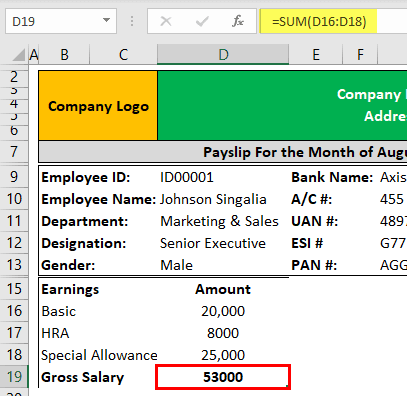
First, include gross salary as per break-up.
The salary structure includes “basic salary,” “HRA,” and “special allowances.” These elements are common elements of a fixed salary.
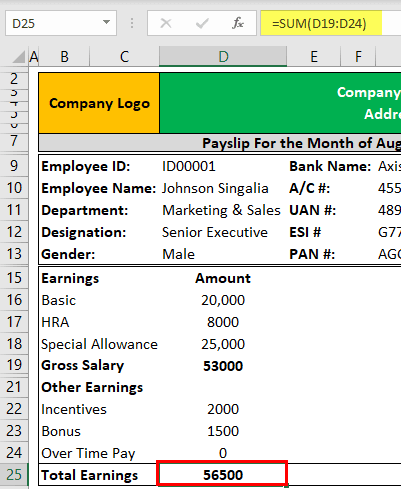
7. We need to include other earnings like incentives, bonuses, overtime, etc.
8. Once the earning part is decided, we need to mention the deductions under various heads per the government’s rules.
The deduction may include Provident Fund, ESI, Professional Tax, Income Tax (TDS), or salary advance (If any). Of course, you can also consist of any other deductions.
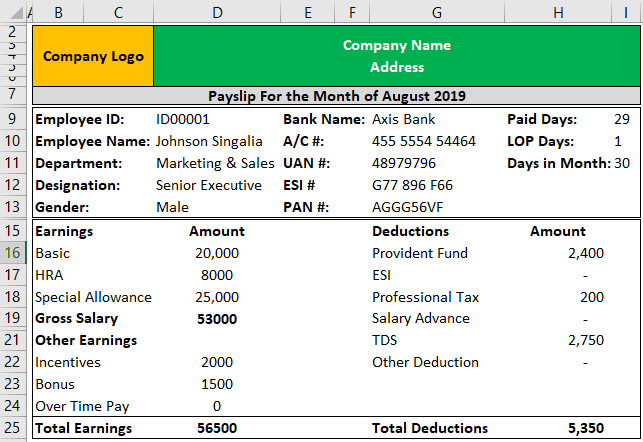
When you include deductions, you must be careful about Professional Tax, Provident Fund, and income tax calculations.
The Provident Fund will be 12% of basic pay. The Professional Tax will be ₹200 if the gross salary is more than ₹15,000 or ₹150.
The income tax calculations should be as per the rules and regulations of the government. You need to calculate TDS after deducting exemptions, so maintain an individual working for this. It is always a good practice to hire a good professional or consultant who is an expert in these matters.
9. Next, we need to arrive at the net pay amount. To calculate this, apply the formula: Total Earnings – Total Deductions.

10. So, once the net payment arrives, the payslip format is ready to use. It looks like this.

Grasping these principles is essential for anyone looking to excel in this area. For those who want to take their learning to the next level, this Excel power query course is designed to build on this foundation and enhance their expertise.
Pay Slip For Not Registered Companies
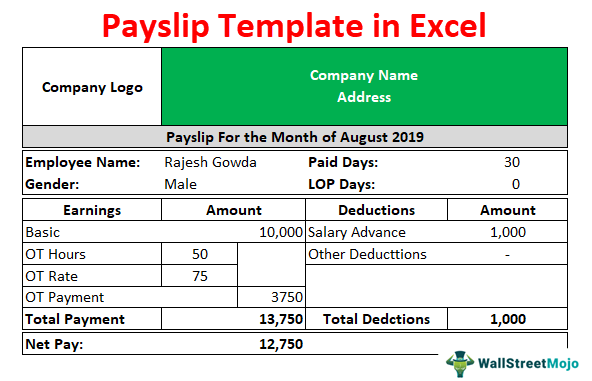
For small industries not registered with the company, secretaries will not have any TDS, PF, or ESI deductions. For them, it is simple to make a payslip.
Keeping in mind those unorganized industries, we also provide a payslip template for them.
Small industries include basic salaries as part of their salary structure. As payroll requirements become more complex, many growing businesses choose payroll software to automate salary calculations, deductions, and payslip generation.
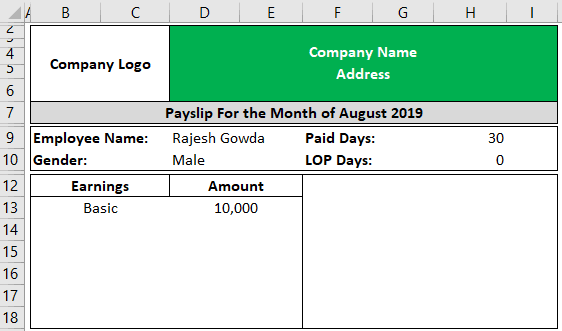
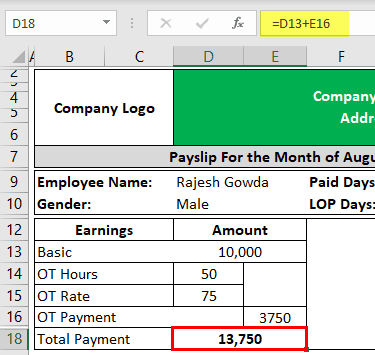
In small industries, employees work overtime most of the time. In such cases, factories pay overtime wages at 1.5 times of regular payment.
The overtime amount is calculated hourly, so it is important to mention OT hours, rate, and amount.

So, the basic and OT payment gives the total payment.
Next, in small industries, the deduction part includes only “salary advances,” so provide this column under deductions.
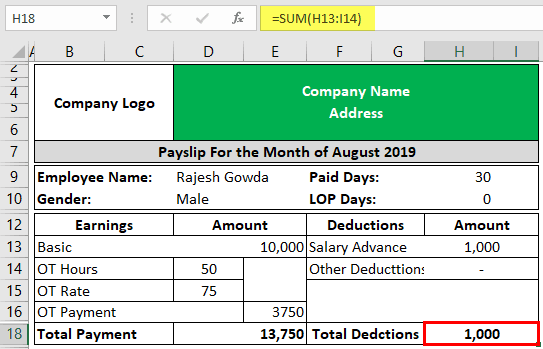
So, now arrives the final net pay.

Important Things To Note
- The payslip looks beautiful, but the payroll team must put much effort into arriving at the net pay amount.
- In today’s sophisticated software, we can design anything and everything with the help of automation.
- We must download the template and modify the contents; if the organization’s salary structure is different.
- Remember to keep ourselves up-to-date. It is because of complex TDS calculations.
Frequently Asked Questions (FAQs)
How do I download a payslip PDF?
To download a payslip, first ensure your organization has an employee portal or HR software. Access your account in the payroll or salary area and find a link to download your wage slip. If not, request a digital copy from HR.
How do you write a payslip format?
A payslip must include the organization’s information, the employee’s basic details, pay period, gross pay, salary components, deductions, net pay, and payment date.
What is the basic payslip?
A payslip is a document provided by employers to employees detailing their earnings, including gross pay, deductions, and net pay, and serves as evidence of earnings and proof of employment.
Recommended Articles
This article is a guide to the Payslip Template in Excel. We discuss building a free payslip template in Excel using formulas with a downloadable Excel sheet. You can also learn more about Excel from the following articles: –